Open topic with navigation
IEC 61131-3 Editor Debugging
In Test mode (Online or Simulation), all editors are animated with real-time values of the edited objects:
- Values of variables, contacts and coils are displayed in diagrams. Double-click on a variable name to force or lock the variable
- Values of variables, contacts and coils are displayed in FFLD diagrams. Double-click on a variable name to force or lock the variable
- Step activities (tokens) are displayed in the editor
- In the text ( or ) editor, place the mouse cursor on a variable name to display its real-time value in a tooltip.
Double-click on the variable name with the Shift key pressed to force or lock the variable
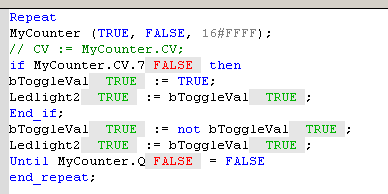
Figure 4-74: Animation in Editors
See also Forcing a variable
|
|
Copyright © 2015 Kollmorgen™
|
|

|
Open topic with navigation


